 Auto Purchase Orders Auto Purchase Orders
 The app’s auto-sync supports four sync methods out of the box: by vendor, collection, location, and SKU prefix. But what if you need to sync products by tags, product type, price range, or other criteria?
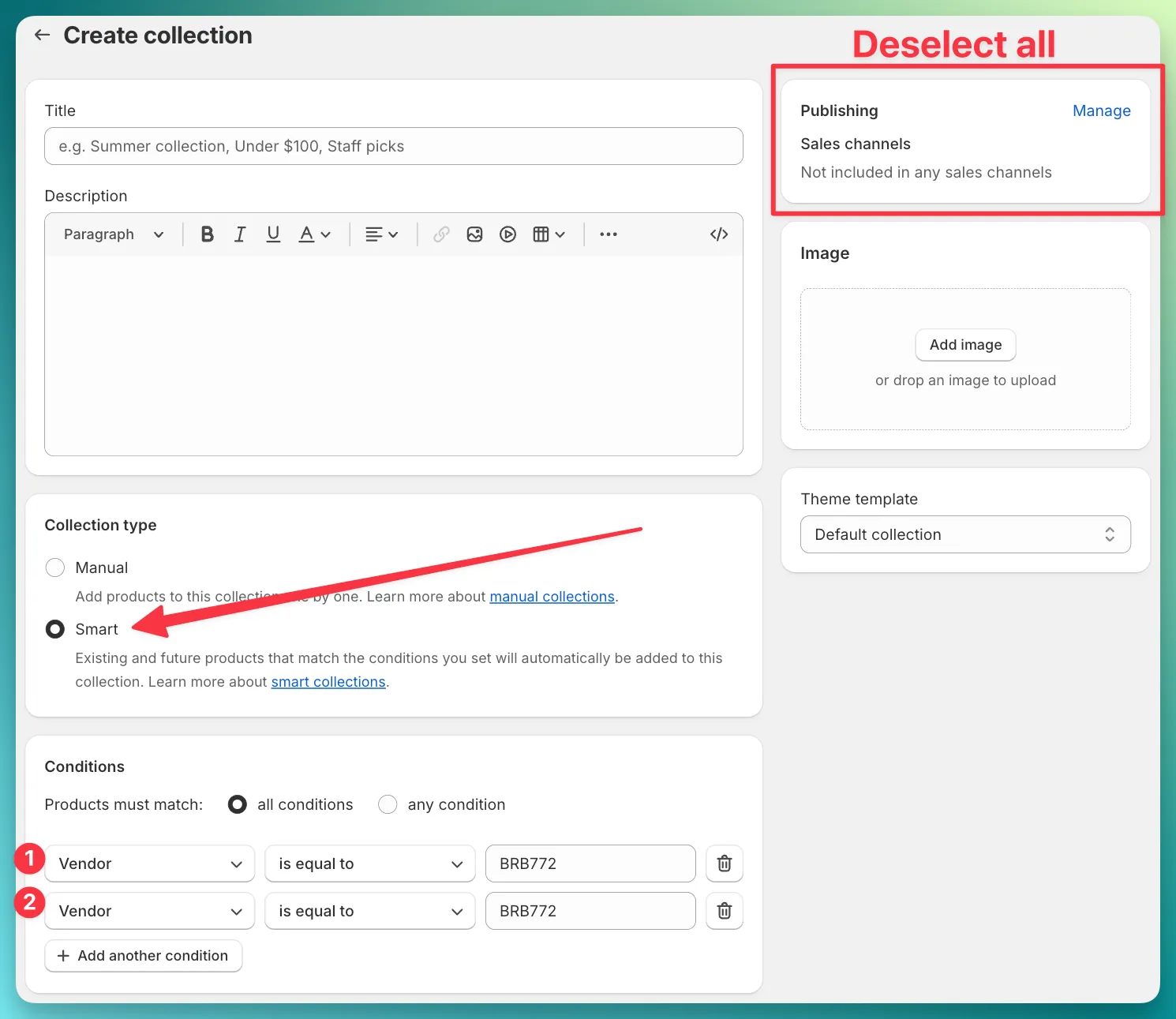
The answer is Shopify smart collections. Create a smart collection with any conditions you need, then use “By collection” as your sync method in the app. The products will link automatically — and stay in sync as your catalog changes.
| Condition | Example | Use case |
|---|---|---|
| Product tag | Tag is equal to supplier-acme | Link all products you’ve tagged for a specific supplier |
| Product type | Product type is equal to T-Shirt | Link all products of a certain type |
| Vendor | Vendor is equal to Nike | Same as the app’s “By vendor”, but combinable with other conditions |
| Price | Price is greater than $20 | Link only products above a price threshold |
| Compare at price | Compare at price is not empty | Link products that are on sale |
| Inventory stock | Inventory stock is greater than 0 | Link only in-stock products |
| Weight | Weight is greater than 1 kg | Link products by physical attributes |
Choose whether products must match all conditions or any condition:
supplier-acme AND product type is T-Shirt)supplier-acme OR tagged supplier-acme-outlet)Give the collection a clear name (e.g. “Supplier - Acme Co.”) and click Save
That’s it — the app will now sync every product in that smart collection to the supplier.
Problem: You tag products with supplier-acme but the app doesn’t have a “By tag” sync method.
Solution:
supplier-acmeEvery product you tag with supplier-acme will automatically link to the supplier.
Problem: A supplier fulfills products from two different lines, tagged line-summer and line-winter.
Solution:
line-summerline-winterBoth product lines will stay synced to the supplier.
For general setup instructions, see How to link Shopify products to a supplier. To understand the benefits of linking, see Why link Shopify products to suppliers?.